

Download MigrateEmails MySQL Database Repair Tool – Secure, Fast, and Reliable Database Recovery for Windows
The MigrateEmails MySQL Database Repair Tool is a powerful, professional-grade software designed specifically for IT administrators and database professionals who face the critical challenge of recovering corrupted MySQL databases. Built for Windows 11 and above, this full version application offers a secure, efficient, and user-friendly solution to restore lost or damaged data without extensive technical expertise. Whether you're managing a small business database or a large enterprise system, this tool ensures minimal downtime and maximum data integrity.
With its advanced scanning algorithms and intelligent recovery engine, the MigrateEmails MySQL Database Repair Tool can analyze and repair even severely damaged MySQL .frm, .ibd, and .MYD files. It supports both standalone and server-based MySQL environments, making it a versatile choice for any recovery scenario. The software is available for free download and is updated regularly to ensure compatibility with the latest MySQL versions and Windows operating systems.
Its intuitive interface and step-by-step recovery wizard make it accessible even to users with limited database experience. For anyone relying on MySQL databases, this tool is an essential addition to their data protection toolkit.
Key Features of MigrateEmails MySQL Database Repair Tool
The MigrateEmails MySQL Database Repair Tool stands out in the crowded data recovery market due to its robust feature set tailored specifically for MySQL database recovery. One of its most powerful capabilities is its deep-level scanning engine, which can detect and repair corrupted MySQL database files, including .frm (table structure), .ibd (InnoDB data), and .MYD (MyISAM data) files. Unlike generic recovery tools, this software understands the internal structure of MySQL databases and applies intelligent repair logic to restore data with high accuracy. The tool also supports partial and full database recovery, allowing users to selectively recover specific tables or entire database schemas based on their needs. This flexibility is crucial in environments where only certain datasets are affected by corruption.
Another standout feature is the real-time preview function, which enables users to view recovered data before committing to the export process. This ensures that the integrity of the recovered data is verified before it’s written to a new location. The tool also supports export to multiple formats, including SQL scripts, CSV, and direct import into a new MySQL instance, giving users maximum flexibility in how they reintegrate the recovered data.
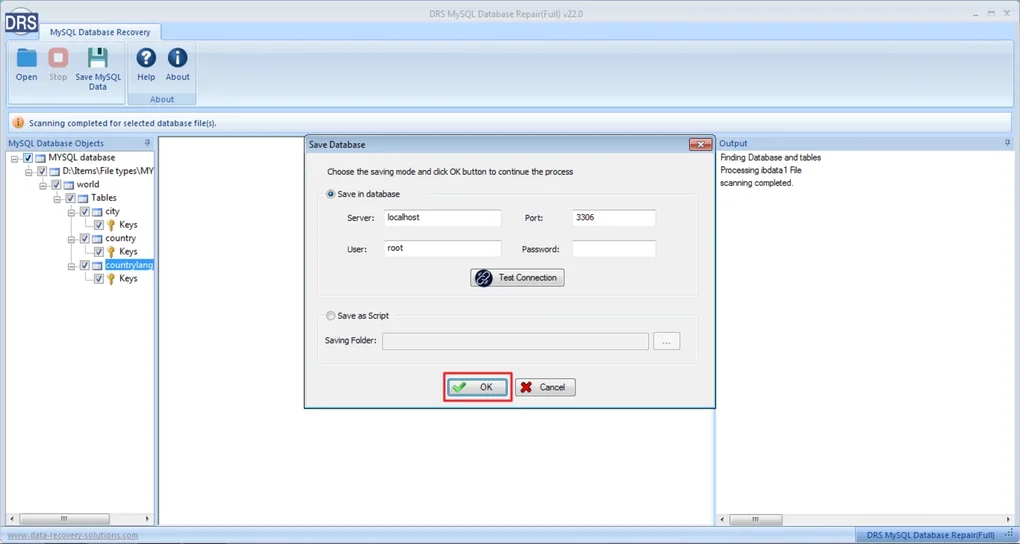
Additionally, the software includes automated backup and restore workflows, which help prevent future data loss by creating snapshots before any repair operation. For enterprise users, the tool offers logging and audit trails, essential for compliance and troubleshooting. The user-friendly wizard interface guides users through every step—from selecting the damaged database to choosing the output destination—making the recovery process smooth and error-free.
With support for both InnoDB and MyISAM storage engines, this tool is a comprehensive solution for any MySQL recovery challenge.
Installation, Usage, and Recovery Workflow
Installing the MigrateEmails MySQL Database Repair Tool is a straightforward process, especially for users familiar with Windows applications. The software is distributed as a standalone installer for Windows 11 and above, ensuring compatibility with modern systems. After downloading the free version from the official site, simply run the installer, accept the license agreement, and follow the on-screen prompts. The installation is quick, typically taking less than two minutes, and does not require administrative privileges for basic operations. Once installed, the application launches with a clean, intuitive dashboard that presents all core functions in a logical sequence.
Using the tool begins with selecting the corrupted MySQL database file or directory. The software supports direct file selection or browsing through common MySQL data directories such as C:\ProgramData\MySQL\MySQL Server X.X\Data. After selection, users initiate the scan and repair process, which can take anywhere from a few seconds to several minutes depending on the database size and extent of corruption. During this phase, the tool performs a comprehensive analysis of file headers, indexes, and data pages, identifying inconsistencies and applying corrective actions. The progress bar and real-time logs keep users informed throughout the process.
Once the scan completes, the tool displays a detailed report of the recovered objects—tables, columns, indexes, and data rows. Users can then use the preview feature to inspect individual records and ensure data accuracy. If satisfied, they can proceed to export the recovered data.
The export options include generating a SQL script for manual import, exporting to CSV for spreadsheet analysis, or directly connecting to a live MySQL server for automated restoration. For advanced users, the tool supports command-line execution, enabling integration into automated backup and recovery scripts. This flexibility makes it ideal for both one-off recovery tasks and enterprise-wide disaster recovery plans.
Compatibility and System Requirements
The MigrateEmails MySQL Database Repair Tool is designed exclusively for the Windows platform, with full support for Windows 11 and Windows 10 (version 21H2 or later). It is optimized for 64-bit systems and requires a minimum of 4 GB of RAM, although 8 GB or more is recommended for handling large databases. The software runs on systems with Intel or AMD processors and requires at least 500 MB of free disk space for installation. Importantly, the tool does not require a separate MySQL server to be installed on the same machine, making it ideal for recovery scenarios where the original database server is offline or unresponsive.
While the software is currently only available for Windows, it is capable of repairing databases from both local and remote sources. Users can connect to MySQL instances hosted on Linux servers via network shares or mapped drives, allowing for recovery operations even in mixed OS environments. The tool supports all major MySQL versions from 5.5 up to 8.4, ensuring compatibility with legacy and modern database deployments. It also works seamlessly with both InnoDB and MyISAM storage engines, which is critical for organizations using a mix of database types. The application is written in native C++ code, ensuring high performance and low resource consumption during recovery operations.
For IT administrators managing multiple systems, the tool offers silent installation mode and configuration file support, enabling deployment across multiple workstations via group policy or scripting tools. This makes it suitable for use in large-scale recovery operations. The software is available in English only, but the interface is clean and self-explanatory, minimizing language dependency. Regular updates are released to address security vulnerabilities, improve recovery accuracy, and add support for new MySQL features. Users are encouraged to check for updates periodically to ensure they’re using the latest version, which includes enhanced stability and performance optimizations.
Pros and Cons: A Balanced View
- Pros:
- High success rate in recovering corrupted MySQL databases, even with severe damage
- Supports both InnoDB and MyISAM storage engines
- Intuitive wizard interface suitable for both beginners and experts
- Real-time data preview before export ensures accuracy
- Multiple export formats (SQL, CSV, direct MySQL import)
- Lightweight and fast, with minimal system resource usage
- Regular updates and strong developer support
- Free to download and use with no hidden costs
- Cons:
- Currently only available for Windows, no Mac or Linux versions
- Requires the original database files to be accessible (no remote recovery without network access)
- Advanced features are limited in the free version; full functionality requires a license
- Only supports English interface, which may be a barrier for non-English speakers
- Large database recovery may take considerable time depending on hardware
Frequently Asked Questions (FAQ)
- Is the MigrateEmails MySQL Database Repair Tool free to download?
- Yes, the tool is completely free to download and use. While the full version offers advanced features, the free version provides robust recovery capabilities for most common corruption scenarios.
- Can I recover data from a MySQL database that won’t start?
- Yes, the tool does not require the MySQL server to be running. It works directly on the database files (.frm, .ibd, .MYD), allowing recovery even when the database is inaccessible due to startup errors.
- Does the tool support MySQL 8.0 and later versions?
- Yes, the MigrateEmails MySQL Database Repair Tool supports MySQL versions from 5.5 up to 8.4, including the latest features and file structures introduced in recent releases.
- Can I export recovered data to a new MySQL server?
- Absolutely. The tool allows direct export to a live MySQL server, as well as generating SQL scripts or CSV files for manual import, making it easy to restore data into a fresh environment.
- Is technical knowledge required to use this tool?
- Not at all. The built-in wizard guides users step-by-step through the recovery process. However, advanced users can access command-line options and configuration files for automation.
Final Verdict and Call to Action
If you're an IT professional, database administrator, or business owner relying on MySQL for mission-critical data, the MigrateEmails MySQL Database Repair Tool is a must-have. Its combination of speed, reliability, and ease of use makes it one of the most effective tools available for database recovery on Windows. Whether you're dealing with accidental deletions, hardware failures, or software bugs, this tool can restore your data with minimal disruption. The free download option lowers the barrier to entry, allowing you to test its capabilities before investing in premium features.
Don’t wait until a database failure impacts your operations. Download MigrateEmails MySQL Database Repair Tool today and safeguard your data with a secure, proven recovery solution. With regular updates and strong developer support, this tool continues to evolve, ensuring long-term reliability. Join thousands of users who trust this software to protect their valuable information.







